Zoho Books is a robust cloud-based accounting software designed to streamline financial management for small and medium-sized businesses. As part of the comprehensive Zoho suite of business applications, Zoho Books offers a wide array of features that cater to diverse accounting needs. It empowers businesses to efficiently manage their financial operations, from invoicing and expense tracking to inventory management and tax compliance. With its user-friendly interface and powerful tools, Zoho Books simplifies complex accounting tasks, enabling businesses to focus on growth and profitability.
One of the standout features of Zoho Books is its ability to seamlessly integrate with various third-party applications through the Zoho Books API. This integration capability allows businesses to customize their accounting processes and connect Zoho Books with other essential business tools, enhancing productivity and operational efficiency. The Zoho Books API provides developers with the flexibility to automate workflows, synchronize data, and build custom solutions tailored to specific business requirements, making it an invaluable asset for businesses looking to optimize their financial management systems.
What is Zoho Books and Why It Matters
Zoho Books is an end-to-end accounting solution that streamlines essential finance operations such as invoicing, billing, payments, reporting, and compliance. Businesses use Zoho Books to automate routine tasks, gain real-time visibility into finances, and eliminate manual errors.
What Zoho Books does
| Function | Description |
|---|---|
| Accounting | Supports bookkeeping, journals, ledgers, bank reconciliation, and compliance. |
| Invoicing & Payments | Create, send, and track invoices; process payments; manage overdue reminders. |
| Banking | Sync bank feeds, categorize transactions, and automate reconciliation. |
| Inventory | Track stock, items, pricing, warehouses, and adjustments. |
| Expenses | Capture, categorize, and reimburse expenses across departments. |
| Reporting & Analytics | Generate balance sheets, P&L, cash flow reports, and tax summaries. |
| Projects & Time Tracking | Log time, track project profitability, and bill project-based services. |
Why Zoho Books Matters to Organizations
Zoho Books is a core component of many financial ecosystems because it brings automation, accuracy, real-time visibility, and scalability into a single cloud-based platform.
1. Automation
Zoho Books automates recurring invoices, approvals, payment reminders, bank feeds, expense categorization, and reconciliation. This reduces manual work for finance teams and improves operational efficiency.
2. Data Accuracy
Zoho Books integrates with sales, CRM, payroll, and inventory systems to synchronize data in real time. This reduces discrepancies, maintains clean financial records, and improves audit readiness.
3. Financial Visibility
With dashboards and customizable reports, Zoho Books gives teams real-time visibility into revenue, expenses, cash flow, and projections.
4. Seamless Integration
It supports deep integration with hundreds of platforms, from e-commerce to CRM and HR systems, removing data silos and creating a connected financial ecosystem.
5. Scalability & Flexibility
Zoho Books supports multi-organization setups, role-based permissions, automation rules, and an extensible API framework that scales with business needs.
Important Terminology for Zoho Books API
Before integrating with Zoho Books API, it’s important to understand a few foundational concepts:
- Organization ID: Each Zoho Books company account is represented by an organization_id, and every API call must reference the intended organization.
- Client ID & Client Secret: Generated from the Zoho API Console, these credentials authenticate your application during the OAuth flow.
- OAuth 2.0: Zoho Books uses OAuth 2.0 for secure authorization, requiring scopes, consent, and token exchanges.
- Access Token: A short-lived token included in every API request to authenticate your application.
- Refresh Token: A long-lived token used to obtain new access tokens without user re-authentication.
- Scopes: Define what level of access the app requests, for example:
- ZohoBooks.invoices.ALL
- ZohoBooks.contacts.ALL
- ZohoBooks.expenses.ALL
- Rate Limits: Zoho enforces strict usage limits, for example, requests per minute per organization. Exceeding these limits returns 429 errors, so retry logic is essential.See Knit’s Zoho Books API directory for the exact current limits by plan.
- Webhooks: Event-based notifications triggered when records change inside Zoho Books, reducing the need for polling.
How to Create a Zoho Books Account and Set Up an Organization
Before you start integrating with Zoho Books, you must create an account and configure your organization.
Follow these steps:
Step 1: Go to the Zoho Books website and click Sign Up.
Step 2: Enter your details, such as email, business name, and country, then click Get Started.
Step 3: Verify your email address using the verification link sent by Zoho.
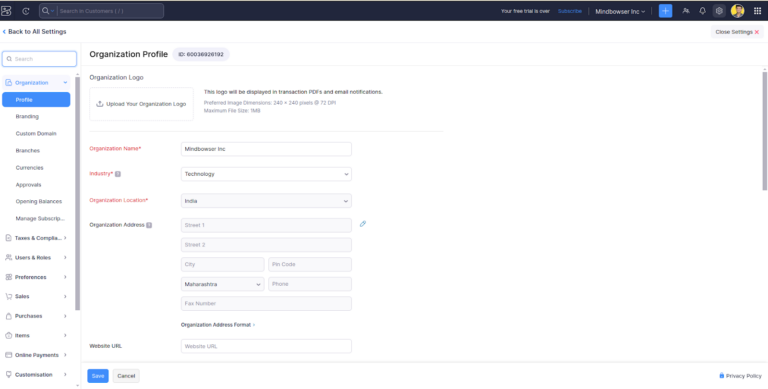
Step 4: Log in to Zoho Books and navigate to Settings → Organization Profile.
Step 5: Fill in your business details, including company name, address, tax information, and base currency.
Step 6: Click Save to complete the organisation setup.
Once these steps are done, your Zoho Books organisation is ready to be used for API-based integrations. Note that the API Base URL is dynamically constructed based on the domain selected during this setup, such as .in.
1. Create the Zoho OAuth Client and Configure Scopes
Step 1: Visit the Zoho API Console and log in with your Zoho account.
Step 2: Create a new OAuth client (you can use Self Client for testing or server-side flows).
Step 3: Choose the appropriate client type and enter the required details (redirect URL, app name, etc.).
Step 4: Add the necessary Zoho Books scopes to your client so the integration can access the required resources.
Required Zoho Books permissions/scopes (minimum):
ZohoBooks.contacts.CREATE
ZohoBooks.contacts.READ
ZohoBooks.invoices.CREATE
ZohoBooks.invoices.READ
ZohoBooks.invoices.UPDATE
ZohoBooks.settings.CREATE
ZohoBooks.settings.READ
These scopes ensure your integration can create and read contacts, manage invoices, and access relevant settings in Zoho Books.
2. Generate the Refresh Token
After configuring the OAuth client and obtaining an authorization code, you must exchange it for an access token and refresh token. The refresh token is critical for long-term integration, as it allows you to generate new access tokens without asking the user to log in again.
Use the following API call to exchange the authorization code:
curl --location --request POST 'https://accounts.zoho.in/oauth/v2/token?code=YOUR_AUTH_CODE&client_id=YOUR_CLIENT_ID&client_secret=YOUR_CLIENT_SECRET&grant_type=authorization_code' \
--header 'Cookie: _zcsr_tmp=YOUR_COOKIE; iamcsr=YOUR_COOKIE; zalb_6e73717622=YOUR_COOKIE'
Replace the placeholders with your actual values:
- YOUR_AUTH_CODE – Authorization code obtained after user consent
- YOUR_CLIENT_ID – Client ID from Zoho API Console
- YOUR_CLIENT_SECRET – Client Secret from Zoho API Console
The response will include an access_token and a refresh_token. Make sure you store the refresh_token, as it will be used to generate new access tokens during ongoing integration. Authentication is handled by setting an Authorization header on each request requiring the format Zoho-oauthtoken [ACCESS_TOKEN].
3. Store Configuration Details Securely
After you successfully obtain the refresh token, securely store the following configuration values (for example, in environment variables, a secrets manager, or a secure properties file):
- Organization ID: The Zoho Books organization you are integrating with
- Template ID: (If applicable) the default invoice/template ID used for document generation
- Refresh Token: Generated via the OAuth token API
These values are required for your application to authenticate against Zoho Books and perform API operations reliably without asking the user to re-authorize frequently.
Key Zoho Books API endpoints at a glance
Zoho Books offers multiple API modules that enable your application to interact with nearly every aspect of the accounting system. When referencing the Zoho Books API documentation, you’ll find key native endpoints such as retrieving items using GET /items or /items/{itemId}. You can also retrieve journal entries using GET {apiUrl}/journals with the organization_id and page query parameters, fetch a single contact using GET {apiUrl}/contacts/{contactId} with the organization_id query parameter, or create or update a contact natively using PUT /contacts/{contactId}.
The table below lists all available modules along with a short description of what each one does.
| Endpoint | Description |
|---|---|
| Organizations | Manage organization information and metadata. |
| Contacts | Manage customers and vendors. |
| Contact Persons | Manage individual contact persons linked to customers/vendors. |
| Estimates | Create and manage quotations/estimates. |
| Sales Orders | Create and manage sales orders. |
| Sales Receipts | Record sales receipts. |
| Invoices | Create, send, update, and manage invoices. |
| Recurring Invoices | Automate invoice generation on a recurring schedule. |
| Credit Notes | Create and manage customer credit notes. |
| Customer Debit Notes | Manage debit notes issued to customers. |
| Customer Payments | Record payments received from customers. |
| Expenses | Add and track business expenses. |
| Recurring Expenses | Manage recurring expense schedules. |
| Retainer Invoices | Create and manage advance retainer invoices. |
| Purchase Orders | Manage purchase orders issued to vendors. |
| Bills | Record and manage vendor bills. |
| Recurring Bills | Automatically generate bills on a recurring schedule. |
| Vendor Credits | Record credit notes issued by vendors. |
| Vendor Payments | Manage payments made to vendors. |
| Custom Modules | Access custom modules created in Zoho Books. |
| Bank Accounts | Fetch and manage bank accounts. |
| Bank Transactions | Retrieve and categorize bank transactions. |
| Bank Rules | Manage rules to automate transaction categorization. |
| Chart of Accounts | Manage accounting accounts and ledgers. |
| Journals | Create and manage manual journal entries. |
| Fixed Assets | Manage asset purchases, depreciation, and disposal. |
| Base Currency Adjustment | Handle currency adjustments. |
| Projects | Manage projects for time tracking and billing. |
| Tasks | Create and manage project tasks. |
| Time Entries | Log and track time entries for projects/tasks. |
| Users | Manage users and assigned roles. |
| Items | Manage products/services used in transactions. |
| Locations | Handle warehouse/stock locations. |
| Currency | Manage multi-currency settings and conversions. |
| Taxes | Configure tax rates, groups, and exemptions. |
| Opening Balance | Set and manage opening account balances. |
| Zoho CRM Integration | Sync data with Zoho CRM. |
Zoho Books API endpoint reference
Bank Accounts
- GET https://www.zohoapis.com/books/v3/bankaccounts : List view of accounts
- GET https://www.zohoapis.com/books/v3/bankaccounts/rules : Get Rules List
- GET https://www.zohoapis.com/books/v3/bankaccounts/rules/{rule_id} : Get a rule
- DELETE https://www.zohoapis.com/books/v3/bankaccounts/rules/{rule_id}?organization_id={organization_id} : Delete a rule
- POST https://www.zohoapis.com/books/v3/bankaccounts/rules?organization_id={organization_id} : Create a rule
- PUT https://www.zohoapis.com/books/v3/bankaccounts/{accountId} : Update bank account
- POST https://www.zohoapis.com/books/v3/bankaccounts/{account_id}/active : Activate account
- POST https://www.zohoapis.com/books/v3/bankaccounts/{account_id}/inactive : Deactivate account
- GET https://www.zohoapis.com/books/v3/bankaccounts/{bank_account_id}/statement/lastimported : Get last imported statement
- DELETE https://www.zohoapis.com/books/v3/bankaccounts/{bank_account_id}/statement/{statement_id}?organization_id={organization_id} : Delete last imported statement
- POST https://www.zohoapis.com/books/v3/bankaccounts?organization_id={organization_id} : Create a bank account
Bank Statements
- POST https://www.zohoapis.com/books/v3/bankstatements?organization_id={organization_id} : Import a Bank/Credit Card Statement
Bank Transactions
- GET https://www.zohoapis.com/books/v3/banktransactions : Get transactions list
- GET https://www.zohoapis.com/books/v3/banktransactions/?organization_id={organization_id} : Get transaction
- POST https://www.zohoapis.com/books/v3/banktransactions/uncategorized/categorize/paymentrefunds?organization_id={organization_id} : Categorize as Customer Payment Refund
- POST https://www.zohoapis.com/books/v3/banktransactions/uncategorized/categorize/vendorpaymentrefunds?organization_id={organization_id} : Categorize as Vendor Payment Refund
- POST https://www.zohoapis.com/books/v3/banktransactions/uncategorized/{transaction_id}/exclude : Exclude a transaction
- POST https://www.zohoapis.com/books/v3/banktransactions/uncategorizeds/{uncategorized_id}/categorize/creditnoterefunds?organization_id={organization_id} : Categorize as credit note refunds
- POST https://www.zohoapis.com/books/v3/banktransactions/uncategorizeds/{uncategorized_id}/categorize/customerpayments?organization_id={organization_id} : Categorize as customer payment
- POST https://www.zohoapis.com/books/v3/banktransactions/uncategorizeds/{uncategorized_id}/categorize/expenses?organization_id={organization_id} : Categorize as expense
- POST https://www.zohoapis.com/books/v3/banktransactions/uncategorizeds/{uncategorized_id}/categorize/vendorcreditrefunds?organization_id={organization_id} : Categorize as vendor credit refunds
- POST https://www.zohoapis.com/books/v3/banktransactions/uncategorizeds/{uncategorized_id}/categorize/vendorpayments?organization_id={organization_id} : Categorize a vendor payment
- POST https://www.zohoapis.com/books/v3/banktransactions/uncategorizeds/{uncategorized_id}/categorize?organization_id={organization_id} : Categorize an uncategorized transaction
- GET https://www.zohoapis.com/books/v3/banktransactions/uncategorizeds/{uncategorized_id}/match : Get matching transactions
- POST https://www.zohoapis.com/books/v3/banktransactions/uncategorizeds/{uncategorized_id}/match?organization_id={organization_id} : Match a transaction
- POST https://www.zohoapis.com/books/v3/banktransactions/uncategorizeds/{uncategorized_id}/restore : Restore a transaction
- POST https://www.zohoapis.com/books/v3/banktransactions/{transaction_id}/uncategorize : Uncategorize a categorized transaction
- POST https://www.zohoapis.com/books/v3/banktransactions/{transaction_id}/unmatch : Unmatch a matched transaction
- POST https://www.zohoapis.com/books/v3/banktransactions?organization_id={organization_id} : Create a transaction for an account
Base Currency Adjustment
- GET https://www.zohoapis.com/books/v3/basecurrencyadjustment : List base currency adjustment
- GET https://www.zohoapis.com/books/v3/basecurrencyadjustment/accounts : List account details for base currency adjustment
- DELETE https://www.zohoapis.com/books/v3/basecurrencyadjustment/{adjustment_id}?organization_id={organization_id} : Delete a base currency adjustment
- GET https://www.zohoapis.com/books/v3/basecurrencyadjustments/{basecurrencyadjustment_id}?organization_id={organization_id} : Get a base currency adjustment
Bills
- PUT https://www.zohoapis.com/books/v3/bill/{bill_id}/customfields : Update custom field in existing bills
- POST https://www.zohoapis.com/books/v3/bills : Create a bill
- GET https://www.zohoapis.com/books/v3/bills/editpage/frompurchaseorders : Convert PO to Bill
- PUT https://www.zohoapis.com/books/v3/bills/{billId} : Update a bill
- POST https://www.zohoapis.com/books/v3/bills/{bill_id}/approve : Approve a bill
- GET https://www.zohoapis.com/books/v3/bills/{bill_id}/attachment : Get a bill attachment
- GET https://www.zohoapis.com/books/v3/bills/{bill_id}/comments : List bill comments & history
- POST https://www.zohoapis.com/books/v3/bills/{bill_id}/comments?organization_id={organization_id} : Add comment to a bill
- GET https://www.zohoapis.com/books/v3/bills/{bill_id}/payments : List bill payments
- POST https://www.zohoapis.com/books/v3/bills/{bill_id}/status/open : Mark a bill as open
- POST https://www.zohoapis.com/books/v3/bills/{bill_id}/status/void : Void a bill
- POST https://www.zohoapis.com/books/v3/bills/{bill_id}/submit : Submit a bill for approval
- GET https://www.zohoapis.com/books/v3/bills/{bill_id}?organization_id={organization_id} : Get a bill
- POST https://www.zohoapis.com/books/v3/bills?organization_id={organization_id} : Create a bill
Chart of Accounts
- GET https://www.zohoapis.com/books/v3/chartofaccounts : List chart of accounts
- GET https://www.zohoapis.com/books/v3/chartofaccounts/transactions : List of transactions for an account
- DELETE https://www.zohoapis.com/books/v3/chartofaccounts/transactions/{transaction_id} : Delete a transaction
- GET https://www.zohoapis.com/books/v3/chartofaccounts/{accountId} : Get an account
- POST https://www.zohoapis.com/books/v3/chartofaccounts/{account_id}/active : Mark an account as active
- POST https://www.zohoapis.com/books/v3/chartofaccounts/{account_id}/inactive : Mark an account as inactive
- DELETE https://www.zohoapis.com/books/v3/chartofaccounts/{account_id}?organization_id={organization_id} : Delete a Bank account
- POST https://www.zohoapis.com/books/v3/chartofaccounts?organization_id={organization_id} : Create an account
Custom Modules
- DELETE https://www.zohoapis.com/books/v3/cm_debtor : Delete Custom Modules
- DELETE https://www.zohoapis.com/books/v3/cm_debtor/{record_id}?organization_id={organization_id} : Delete individual records
Contacts
- GET https://www.zohoapis.com/books/v3/contacts : List Contacts
- POST https://www.zohoapis.com/books/v3/contacts/contactpersons/{contact_person_id}/primary : Mark as primary contact person
- PUT https://www.zohoapis.com/books/v3/contacts/contactpersons/{contact_person_id}?organization_id={organization_id} : Update a contact person
- POST https://www.zohoapis.com/books/v3/contacts/contactpersons?organization_id={organization_id} : Create a contact person
- PUT https://www.zohoapis.com/books/v3/contacts/{contactId} : Update a Contact
- POST https://www.zohoapis.com/books/v3/contacts/{contact_id}/active : Mark as Active
- GET https://www.zohoapis.com/books/v3/contacts/{contact_id}/address : Get Contact Addresses
- DELETE https://www.zohoapis.com/books/v3/contacts/{contact_id}/address/{address_id}?organization_id={organization_id} : Delete Additional Address
- POST https://www.zohoapis.com/books/v3/contacts/{contact_id}/address?organization_id={organization_id} : Add Additional Address
- GET https://www.zohoapis.com/books/v3/contacts/{contact_id}/comments : List Comments
- GET https://www.zohoapis.com/books/v3/contacts/{contact_id}/contactpersons : List contact persons
- GET https://www.zohoapis.com/books/v3/contacts/{contact_id}/contactpersons/{contact_person_id} : Get a contact person
- POST https://www.zohoapis.com/books/v3/contacts/{contact_id}/email?organization_id={organization_id} : Email Contact
- POST https://www.zohoapis.com/books/v3/contacts/{contact_id}/inactive : Mark as Inactive
- POST https://www.zohoapis.com/books/v3/contacts/{contact_id}/paymentreminder/disable : Disable Payment Reminders
- POST https://www.zohoapis.com/books/v3/contacts/{contact_id}/paymentreminder/enable : Enable Payment Reminders
- POST https://www.zohoapis.com/books/v3/contacts/{contact_id}/portal/enable?organization_id={organization_id} : Enable Portal Access
- GET https://www.zohoapis.com/books/v3/contacts/{contact_id}/refunds : List Refunds
- GET https://www.zohoapis.com/books/v3/contacts/{contact_id}/statements/email?organization_id={organization_id} : Get Statement Mail Content
- POST https://www.zohoapis.com/books/v3/contacts/{contact_id}/track1099 : Track a contact for 1099 reporting
- POST https://www.zohoapis.com/books/v3/contacts/{contact_id}/untrack1099 : Untrack 1099
- DELETE https://www.zohoapis.com/books/v3/contacts/{contact_id}?organization_id={organization_id} : Delete a Contact
- PUT https://www.zohoapis.com/books/v3/contacts?organization_id={organization_id} : Update a contact using a custom field’s unique value
Credit Notes
- GET https://www.zohoapis.com/books/v3/creditnotes : List all Credit Notes
- GET https://www.zohoapis.com/books/v3/creditnotes/refunds : List credit note refunds
- GET https://www.zohoapis.com/books/v3/creditnotes/templates : List credit note template
- POST https://www.zohoapis.com/books/v3/creditnotes/{credit_note_id}/status/open : Convert Credit Note to Open
- GET https://www.zohoapis.com/books/v3/creditnotes/{creditnote_id} : Get a credit note
- POST https://www.zohoapis.com/books/v3/creditnotes/{creditnote_id}/approve : Approve a credit note
- GET https://www.zohoapis.com/books/v3/creditnotes/{creditnote_id}/comments : List credit note comments & history
- GET https://www.zohoapis.com/books/v3/creditnotes/{creditnote_id}/email : Get email content of a credit note
- POST https://www.zohoapis.com/books/v3/creditnotes/{creditnote_id}/email?organization_id={organization_id} : Email a credit note
- GET https://www.zohoapis.com/books/v3/creditnotes/{creditnote_id}/emailhistory : Email history
- GET https://www.zohoapis.com/books/v3/creditnotes/{creditnote_id}/invoices : List invoices credited
- DELETE https://www.zohoapis.com/books/v3/creditnotes/{creditnote_id}/invoices/{invoice_id} : Delete invoices credited
- POST https://www.zohoapis.com/books/v3/creditnotes/{creditnote_id}/invoices?organization_id={organization_id} : Credit to an invoice
- GET https://www.zohoapis.com/books/v3/creditnotes/{creditnote_id}/refunds : List refunds of a credit note
- GET https://www.zohoapis.com/books/v3/creditnotes/{creditnote_id}/refunds/{creditnote_refund_id} : Get credit note refund
- PUT https://www.zohoapis.com/books/v3/creditnotes/{creditnote_id}/refunds/{refund_id}?organization_id={organization_id} : Update credit note refund
- POST https://www.zohoapis.com/books/v3/creditnotes/{creditnote_id}/refunds?organization_id={organization_id} : Refund Credit Note
- POST https://www.zohoapis.com/books/v3/creditnotes/{creditnote_id}/status/draft : Convert Credit Note to Draft
- POST https://www.zohoapis.com/books/v3/creditnotes/{creditnote_id}/status/void : Void a Credit Note
- POST https://www.zohoapis.com/books/v3/creditnotes/{creditnote_id}/submit?organization_id={organization_id} : Submit a credit note for approval
- PUT https://www.zohoapis.com/books/v3/creditnotes/{creditnote_id}/templates/{template_id}?organization_id={organization_id} : Update a credit note template
- DELETE https://www.zohoapis.com/books/v3/creditnotes/{creditnote_id}?organization_id={organization_id} : Delete a credit note
- POST https://www.zohoapis.com/books/v3/creditnotes?organization_id={organization_id} : Create a credit note
CRM
- POST https://www.zohoapis.com/books/v3/crm/account/import?organization_id={organization_id} : Import a customer using the CRM account ID
- POST https://www.zohoapis.com/books/v3/crm/contact/import?organization_id={organization_id} : Import a customer using CRM contact ID
- POST https://www.zohoapis.com/books/v3/crm/vendor/import : Import a vendor using the CRM vendor ID
Customer Payments
- PUT https://www.zohoapis.com/books/v3/customerpayment/{customerpayment_id}/customfields : Update custom field in existing customerpayments
- GET https://www.zohoapis.com/books/v3/customerpayments : List Customer Payments
- PUT https://www.zohoapis.com/books/v3/customerpayments/{customerpayment_id}/refunds/?organization_id={organization_id} : Update a refund
- POST https://www.zohoapis.com/books/v3/customerpayments/{customerpayment_id}/refunds?organization_id={organization_id} : Refund an excess customer payment
- PUT https://www.zohoapis.com/books/v3/customerpayments/{paymentId} : Update a payment
- GET https://www.zohoapis.com/books/v3/customerpayments/{payment_id}/refunds : List refunds of a customer payment
- DELETE https://www.zohoapis.com/books/v3/customerpayments/{payment_id}/refunds/?organization_id={organization_id} : Delete a Refund
- GET https://www.zohoapis.com/books/v3/customerpayments/{payment_id}?organization_id={organization_id} : Retrieve a payment
- PUT https://www.zohoapis.com/books/v3/customerpayments?organization_id={organization_id} : Update a payment using a custom field’s unique value
Debtor
- GET https://www.zohoapis.com/books/v3/debtor : Get Record List of a Custom Module
- POST https://www.zohoapis.com/books/v3/debtor?organization_id={organization_id} : Create Custom Modules
- GET https://www.zohoapis.com/books/v3/debtors/{debtor_id} : Get Individual Record Details
- PUT https://www.zohoapis.com/books/v3/debtors/{debtor_id}?organization_id={organization_id} : Update Custom Module
Employees
- DELETE https://www.zohoapis.com/books/v3/employee/?organization_id={organization_id} : Delete an employee
- GET https://www.zohoapis.com/books/v3/employees : List employees
- GET https://www.zohoapis.com/books/v3/employees/?organization_id={organization_id} : Get an employee
- POST https://www.zohoapis.com/books/v3/employees?organization_id={organization_id} : Create an employee
Estimates
- GET https://www.zohoapis.com/books/v3/estimates : List estimates
- POST https://www.zohoapis.com/books/v3/estimates/email : Email multiple estimates
- GET https://www.zohoapis.com/books/v3/estimates/pdf : Bulk export estimates
- GET https://www.zohoapis.com/books/v3/estimates/print : Bulk print estimates
- GET https://www.zohoapis.com/books/v3/estimates/templates : List Estimate Template
- GET https://www.zohoapis.com/books/v3/estimates/{estimate_id} : Get an estimate
- POST https://www.zohoapis.com/books/v3/estimates/{estimate_id}/approve : Approve an estimate.
- GET https://www.zohoapis.com/books/v3/estimates/{estimate_id}/comments : List estimate comments & history
- POST https://www.zohoapis.com/books/v3/estimates/{estimate_id}/comments?organization_id={organization_id} : Add Comments to Estimate
- PUT https://www.zohoapis.com/books/v3/estimates/{estimate_id}/customfields : Update custom field in existing estimates
- GET https://www.zohoapis.com/books/v3/estimates/{estimate_id}/email : Get estimate email content
- POST https://www.zohoapis.com/books/v3/estimates/{estimate_id}/email?organization_id={organization_id} : Email an estimate
- POST https://www.zohoapis.com/books/v3/estimates/{estimate_id}/status/accepted : Mark an estimate as accepted
- POST https://www.zohoapis.com/books/v3/estimates/{estimate_id}/status/declined : Mark an estimate as declined
- POST https://www.zohoapis.com/books/v3/estimates/{estimate_id}/status/sent : Mark an estimate as sent
- POST https://www.zohoapis.com/books/v3/estimates/{estimate_id}/submit : Submit an estimate for approval
- PUT https://www.zohoapis.com/books/v3/estimates/{estimate_id}/templates/{template_id}?organization_id={organization_id} : Update estimate template
- PUT https://www.zohoapis.com/books/v3/estimates/{estimate_id}?organization_id={organization_id} : Update an Estimate
- POST https://www.zohoapis.com/books/v3/estimates?organization_id={organization_id} : Create an Estimate
Expenses
- GET https://www.zohoapis.com/books/v3/expenses : List Expenses
- GET https://www.zohoapis.com/books/v3/expenses/{expense_id} : Get an Expense
- GET https://www.zohoapis.com/books/v3/expenses/{expense_id}/comments : List expense History & Comments
- POST https://www.zohoapis.com/books/v3/expenses/{expense_id}/receipt : Add receipt to an expense
- PUT https://www.zohoapis.com/books/v3/expenses/{expense_id}?organization_id={organization_id} : Update an Expense
- PUT https://www.zohoapis.com/books/v3/expenses?organization_id={organization_id} : Update an expense using a custom field’s unique value
Invoices
- PUT https://www.zohoapis.com/books/v3/invoice/{invoice_id}/customfields : Update custom field in existing invoices
- POST https://www.zohoapis.com/books/v3/invoices : Create an invoice
- POST https://www.zohoapis.com/books/v3/invoices/email : Email invoices
- DELETE https://www.zohoapis.com/books/v3/invoices/expenses/receipt?organization_id={organization_id} : Delete the expense receipt
- POST https://www.zohoapis.com/books/v3/invoices/fromsalesorder : Create an instant invoice
- POST https://www.zohoapis.com/books/v3/invoices/paymentreminder : Bulk invoice reminder
- GET https://www.zohoapis.com/books/v3/invoices/pdf : Bulk export Invoices
- GET https://www.zohoapis.com/books/v3/invoices/print : Bulk print invoices
- GET https://www.zohoapis.com/books/v3/invoices/templates : List invoice templates
- PUT https://www.zohoapis.com/books/v3/invoices/{invoiceId} : Update an invoice
- PUT https://www.zohoapis.com/books/v3/invoices/{invoice_id}/address/billing?organization_id={organization_id} : Update billing address
- PUT https://www.zohoapis.com/books/v3/invoices/{invoice_id}/address/shipping?organization_id={organization_id} : Update shipping address
- POST https://www.zohoapis.com/books/v3/invoices/{invoice_id}/approve : Approve an invoice
- GET https://www.zohoapis.com/books/v3/invoices/{invoice_id}/attachment : Get an invoice attachment
- DELETE https://www.zohoapis.com/books/v3/invoices/{invoice_id}/attachment?organization_id={organization_id} : Delete an attachment
- POST https://www.zohoapis.com/books/v3/invoices/{invoice_id}/comments : Add comment to an invoice
- POST https://www.zohoapis.com/books/v3/invoices/{invoice_id}/credits?organization_id={organization_id} : Apply credits
- GET https://www.zohoapis.com/books/v3/invoices/{invoice_id}/creditsapplied : List credits applied
- DELETE https://www.zohoapis.com/books/v3/invoices/{invoice_id}/creditsapplied/{credit_id} : Delete applied credit
- GET https://www.zohoapis.com/books/v3/invoices/{invoice_id}/email : Get invoice email content
- POST https://www.zohoapis.com/books/v3/invoices/{invoice_id}/email?organization_id={organization_id} : Email an invoice
- POST https://www.zohoapis.com/books/v3/invoices/{invoice_id}/paymentreminder/disable : Disable payment reminder
- POST https://www.zohoapis.com/books/v3/invoices/{invoice_id}/paymentreminder/enable : Enable payment reminder
- POST https://www.zohoapis.com/books/v3/invoices/{invoice_id}/paymentreminder?organization_id={organization_id} : Remind Customer
- GET https://www.zohoapis.com/books/v3/invoices/{invoice_id}/payments : List invoice payments
- POST https://www.zohoapis.com/books/v3/invoices/{invoice_id}/status/draft : Mark as draft
- POST https://www.zohoapis.com/books/v3/invoices/{invoice_id}/status/sent : Mark an invoice as sent
- POST https://www.zohoapis.com/books/v3/invoices/{invoice_id}/status/void : Void an invoice
- POST https://www.zohoapis.com/books/v3/invoices/{invoice_id}/submit?organization_id={organization_id} : Submit an invoice for approval
- PUT https://www.zohoapis.com/books/v3/invoices/{invoice_id}/templates/{template_id}?organization_id={organization_id} : Update invoice template
- POST https://www.zohoapis.com/books/v3/invoices/{invoice_id}/writeoff : Write off invoice
- POST https://www.zohoapis.com/books/v3/invoices/{invoice_id}/writeoff/cancel : Cancel write off
- GET https://www.zohoapis.com/books/v3/invoices/{invoice_id}?organization_id={organization_id} : Get an invoice
- PUT https://www.zohoapis.com/books/v3/invoices?organization_id={organization_id} : Update an invoice using a custom field’s unique value
Items
- PUT https://www.zohoapis.com/books/v3/item/{item_id}/customfields : Update custom field in existing items
- GET https://www.zohoapis.com/books/v3/items : List items
- PUT https://www.zohoapis.com/books/v3/items/{item_id}?organization_id={organization_id} : Update an item
- PUT https://www.zohoapis.com/books/v3/items?organization_id={organization_id} : Update an item using a custom field’s unique value
Journals
- GET https://www.zohoapis.com/books/v3/journals : Get journal list
- POST https://www.zohoapis.com/books/v3/journals/comments?organization_id={organization_id} : Add comment to a journal
- GET https://www.zohoapis.com/books/v3/journals/{journalEntryId} : Get journal
- POST https://www.zohoapis.com/books/v3/journals/{journal_id}/attachment?organization_id={organization_id} : Add attachment to a journal
- POST https://www.zohoapis.com/books/v3/journals/{journal_id}/status/publish : Mark a journal as published
- DELETE https://www.zohoapis.com/books/v3/journals/{journal_id}?organization_id={organization_id} : Delete a journal
- POST https://www.zohoapis.com/books/v3/journals?organization_id={organization_id} : Create a journal
Projects
- GET https://www.zohoapis.com/books/v3/projects : List projects
- GET https://www.zohoapis.com/books/v3/projects/timeentries : List time entries
- GET https://www.zohoapis.com/books/v3/projects/timeentries/runningtimer/me?organization_id={organization_id} : Get current running timer
- POST https://www.zohoapis.com/books/v3/projects/timeentries/timer/stop?organization_id={organization_id} : Stop timer
- DELETE https://www.zohoapis.com/books/v3/projects/timeentries/{time_entry_id}?organization_id={organization_id} : Delete time entry
- GET https://www.zohoapis.com/books/v3/projects/timeentries/{timeentrie_id} : Get a time entry
- POST https://www.zohoapis.com/books/v3/projects/timeentries/{timeentrie_id}/timer/start?organization_id={organization_id} : Start timer
- PUT https://www.zohoapis.com/books/v3/projects/timeentries/{timeentrie_id}?organization_id={organization_id} : Update time entry
- DELETE https://www.zohoapis.com/books/v3/projects/timeentries?organization_id={organization_id} : Delete time entries
- GET https://www.zohoapis.com/books/v3/projects/{project_id} : Get a project
- POST https://www.zohoapis.com/books/v3/projects/{project_id}/active : Activate project
- POST https://www.zohoapis.com/books/v3/projects/{project_id}/clone?organization_id={organization_id} : Clone project
- GET https://www.zohoapis.com/books/v3/projects/{project_id}/comments : List comments
- DELETE https://www.zohoapis.com/books/v3/projects/{project_id}/comments/{comment_id} : Delete comment
- POST https://www.zohoapis.com/books/v3/projects/{project_id}/comments?organization_id={organization_id} : Post comment
- POST https://www.zohoapis.com/books/v3/projects/{project_id}/inactive : Inactivate a project
- GET https://www.zohoapis.com/books/v3/projects/{project_id}/tasks : List tasks
- GET https://www.zohoapis.com/books/v3/projects/{project_id}/tasks/{task_id} : Get a task
- PUT https://www.zohoapis.com/books/v3/projects/{project_id}/tasks/{task_id}?organization_id={organization_id} : Update a task
- POST https://www.zohoapis.com/books/v3/projects/{project_id}/tasks?organization_id={organization_id} : Add a task
- GET https://www.zohoapis.com/books/v3/projects/{project_id}/users : List Users
- POST https://www.zohoapis.com/books/v3/projects/{project_id}/users/invite?organization_id={organization_id} : Invite User to Project
- GET https://www.zohoapis.com/books/v3/projects/{project_id}/users/{user_id} : Get a User
- DELETE https://www.zohoapis.com/books/v3/projects/{project_id}/users/{user_id}?organization_id={organization_id} : Delete user
- POST https://www.zohoapis.com/books/v3/projects/{project_id}/users?organization_id={organization_id} : Assign users to a project
- DELETE https://www.zohoapis.com/books/v3/projects/{project_id}?organization_id={organization_id} : Delete project
- POST https://www.zohoapis.com/books/v3/projects?organization_id={organization_id} : Create a project
Purchase Orders
- GET https://www.zohoapis.com/books/v3/purchaseorders : List purchase orders
- DELETE https://www.zohoapis.com/books/v3/purchaseorders/?organization_id={organization_id} : Delete purchase order
- GET https://www.zohoapis.com/books/v3/purchaseorders/templates : List purchase order templates
- GET https://www.zohoapis.com/books/v3/purchaseorders/{purchaseOrderId} : Get a purchase order
- POST https://www.zohoapis.com/books/v3/purchaseorders/{purchaseorder_id}/approve : Approve a purchase order
- POST https://www.zohoapis.com/books/v3/purchaseorders/{purchaseorder_id}/attachment : Add attachment to a purchase order
- GET https://www.zohoapis.com/books/v3/purchaseorders/{purchaseorder_id}/comments : List purchase order comments & history
- POST https://www.zohoapis.com/books/v3/purchaseorders/{purchaseorder_id}/comments?organization_id={organization_id} : Add comment to purchase order
- PUT https://www.zohoapis.com/books/v3/purchaseorders/{purchaseorder_id}/customfields : Update custom field in existing purchaseorders
- GET https://www.zohoapis.com/books/v3/purchaseorders/{purchaseorder_id}/email : Get purchase order email content
- POST https://www.zohoapis.com/books/v3/purchaseorders/{purchaseorder_id}/email?organization_id={organization_id} : Email a purchase order
- POST https://www.zohoapis.com/books/v3/purchaseorders/{purchaseorder_id}/status/billed : Mark as billed
- POST https://www.zohoapis.com/books/v3/purchaseorders/{purchaseorder_id}/status/cancelled : Cancel a purchase order
- POST https://www.zohoapis.com/books/v3/purchaseorders/{purchaseorder_id}/status/open : Mark a purchase order as open
- POST https://www.zohoapis.com/books/v3/purchaseorders/{purchaseorder_id}/submit : Submit a purchase order for approval
- PUT https://www.zohoapis.com/books/v3/purchaseorders/{purchaseorder_id}/templates/{template_id}?organization_id={organization_id} : Update purchase order template
- POST https://www.zohoapis.com/books/v3/purchaseorders?organization_id={organization_id} : Create a purchase order
Recurring Bills
- GET https://www.zohoapis.com/books/v3/recurring_bills/{recurring_bill_id} : Get a recurring bill
- DELETE https://www.zohoapis.com/books/v3/recurring_bills/{recurring_bill_id}?organization_id={organization_id} : Delete a recurring bill
- GET https://www.zohoapis.com/books/v3/recurringbills : List recurring bills
- GET https://www.zohoapis.com/books/v3/recurringbills/{recurring_bill_id}/comments : List recurring bill history
- POST https://www.zohoapis.com/books/v3/recurringbills/{recurring_bill_id}/status/resume : Resume a recurring Bill
- POST https://www.zohoapis.com/books/v3/recurringbills/{recurring_bill_id}/status/stop : Stop a recurring bill
- PUT https://www.zohoapis.com/books/v3/recurringbills/{recurring_bill_id}?organization_id={organization_id} : Update a recurring bill
- PUT https://www.zohoapis.com/books/v3/recurringbills?organization_id={organization_id} : Update a recurring bill using a custom field’s unique value
Recurring Expenses
- GET https://www.zohoapis.com/books/v3/recurringexpenses : List recurring expenses
- GET https://www.zohoapis.com/books/v3/recurringexpenses/{recurring_expense_id}/comments : List recurring expense history
- POST https://www.zohoapis.com/books/v3/recurringexpenses/{recurring_expense_id}/status/resume : Resume a recurring Expense
- POST https://www.zohoapis.com/books/v3/recurringexpenses/{recurring_expense_id}/status/stop : Stop a recurring expense
- PUT https://www.zohoapis.com/books/v3/recurringexpenses/{recurring_expense_id}?organization_id={organization_id} : Update a recurring expense
- GET https://www.zohoapis.com/books/v3/recurringexpenses/{recurringexpense_id}/expenses?organization_id={organization_id} : List child expenses created
- GET https://www.zohoapis.com/books/v3/recurringexpenses/{recurringexpense_id}?organization_id={organization_id} : Get a recurring expense
- POST https://www.zohoapis.com/books/v3/recurringexpenses?organization_id={organization_id} : Create a recurring expense
Recurring Invoices
- GET https://www.zohoapis.com/books/v3/recurringinvoices : List all Recurring Invoice
- DELETE https://www.zohoapis.com/books/v3/recurringinvoices/{invoice_id}?organization_id={organization_id} : Delete a Recurring Invoice
- GET https://www.zohoapis.com/books/v3/recurringinvoices/{recurring_invoice_id} : Get a Recurring Invoice
- GET https://www.zohoapis.com/books/v3/recurringinvoices/{recurring_invoice_id}/comments : List Recurring Invoice History
- POST https://www.zohoapis.com/books/v3/recurringinvoices/{recurring_invoice_id}/status/resume : Resume a Recurring Invoice
- POST https://www.zohoapis.com/books/v3/recurringinvoices/{recurring_invoice_id}/status/stop : Stop a Recurring Invoice
- PUT https://www.zohoapis.com/books/v3/recurringinvoices/{recurring_invoice_id}/templates/{template_id} : Update Recurring Invoice Template
- PUT https://www.zohoapis.com/books/v3/recurringinvoices/{recurringinvoice_id}?organization_id={organization_id} : Update Recurring Invoice
- POST https://www.zohoapis.com/books/v3/recurringinvoices?organization_id={organization_id} : Create a Recurring Invoice
Retainer Invoices
- GET https://www.zohoapis.com/books/v3/retainerinvoices : List a retainer invoices
- POST https://www.zohoapis.com/books/v3/retainerinvoices/approve?organization_id={organization_id} : Approve a retainer invoice.
- POST https://www.zohoapis.com/books/v3/retainerinvoices/submit : Submit a retainer invoice for approval
- GET https://www.zohoapis.com/books/v3/retainerinvoices/templates : List retainer invoice templates
- GET https://www.zohoapis.com/books/v3/retainerinvoices/{invoice_id}/attachment : Get a retainer invoice attachment
- POST https://www.zohoapis.com/books/v3/retainerinvoices/{invoice_id}/attachment?organization_id={organization_id} : Add attachment to a retainer invoice
- GET https://www.zohoapis.com/books/v3/retainerinvoices/{invoice_id}/email : Get retainer invoice email content
- POST https://www.zohoapis.com/books/v3/retainerinvoices/{invoice_id}/status/sent : Mark a retainer invoice as sent
- POST https://www.zohoapis.com/books/v3/retainerinvoices/{invoice_id}/status/void : Void a retainer invoice
- PUT https://www.zohoapis.com/books/v3/retainerinvoices/{invoice_id}/templates/{template_id}?organization_id={organization_id} : Update retainer invoice template
- DELETE https://www.zohoapis.com/books/v3/retainerinvoices/{invoice_id}?organization_id={organization_id} : Delete a retainer invoice
- GET https://www.zohoapis.com/books/v3/retainerinvoices/{retainerinvoice_id} : Get a retainer invoice
- GET https://www.zohoapis.com/books/v3/retainerinvoices/{retainerinvoice_id}/comments : List retainer invoice comments & history
- POST https://www.zohoapis.com/books/v3/retainerinvoices/{retainerinvoice_id}/comments?organization_id={organization_id} : Add comment to retainer invoice
- POST https://www.zohoapis.com/books/v3/retainerinvoices/{retainerinvoice_id}/email?organization_id={organization_id} : Email a retainer invoice
- PUT https://www.zohoapis.com/books/v3/retainerinvoices/{retainerinvoice_id}?organization_id={organization_id} : Update a Retainer Invoice
- POST https://www.zohoapis.com/books/v3/retainerinvoices?organization_id={organization_id} : Create a retainerinvoice
Sales Orders
- GET https://www.zohoapis.com/books/v3/salesorders : List sales orders
- GET https://www.zohoapis.com/books/v3/salesorders/pdf : Bulk export sales orders
- GET https://www.zohoapis.com/books/v3/salesorders/print : Bulk print sales orders
- GET https://www.zohoapis.com/books/v3/salesorders/templates : List sales order templates
- GET https://www.zohoapis.com/books/v3/salesorders/{salesorder_id} : Get a sales order
- POST https://www.zohoapis.com/books/v3/salesorders/{salesorder_id}/approve : Approve a sales order.
- PUT https://www.zohoapis.com/books/v3/salesorders/{salesorder_id}/attachment : Update attachment preference
- POST https://www.zohoapis.com/books/v3/salesorders/{salesorder_id}/attachment?organization_id={organization_id} : Add attachment to a sales order
- GET https://www.zohoapis.com/books/v3/salesorders/{salesorder_id}/comments : List sales order comments & history
- PUT https://www.zohoapis.com/books/v3/salesorders/{salesorder_id}/comments/{comment_id}?organization_id={organization_id} : Update comment
- POST https://www.zohoapis.com/books/v3/salesorders/{salesorder_id}/comments?organization_id={organization_id} : Add comment to sales order
- PUT https://www.zohoapis.com/books/v3/salesorders/{salesorder_id}/customfields : Update custom field in existing salesorders
- GET https://www.zohoapis.com/books/v3/salesorders/{salesorder_id}/email : Get sales order email content
- POST https://www.zohoapis.com/books/v3/salesorders/{salesorder_id}/email?organization_id={organization_id} : Email a sales order
- POST https://www.zohoapis.com/books/v3/salesorders/{salesorder_id}/status/open : Mark a sales order as open
- POST https://www.zohoapis.com/books/v3/salesorders/{salesorder_id}/status/void?organization_id={organization_id} : Mark a sales order as void
- POST https://www.zohoapis.com/books/v3/salesorders/{salesorder_id}/submit : Submit a sales order for approval
- POST https://www.zohoapis.com/books/v3/salesorders/{salesorder_id}/substatus/{substatus}?organization_id={organization_id} : Update a sales order sub status
- PUT https://www.zohoapis.com/books/v3/salesorders/{salesorder_id}/templates/{template_id}?organization_id={organization_id} : Update sales order template
- DELETE https://www.zohoapis.com/books/v3/salesorders/{salesorder_id}?organization_id={organization_id} : Delete a sales order
- PUT https://www.zohoapis.com/books/v3/salesorders?organization_id={organization_id} : Update a sales order using a custom field’s unique value
Settings
Currencies
- GET https://www.zohoapis.com/books/v3/settings/currencies : List Currencies
- GET https://www.zohoapis.com/books/v3/settings/currencies/{currencie_id} : Get a Currency
- GET https://www.zohoapis.com/books/v3/settings/currencies/{currencie_id}/exchangerates : List exchange rates
- PUT https://www.zohoapis.com/books/v3/settings/currencies/{currencie_id}/exchangerates/{exchangerate_id}?organization_id={organization_id} : Update an exchange rate
- POST https://www.zohoapis.com/books/v3/settings/currencies/{currencie_id}/exchangerates?organization_id={organization_id} : Create an exchange rate
- PUT https://www.zohoapis.com/books/v3/settings/currencies/{currencie_id}?organization_id={organization_id} : Update a Currency
- DELETE https://www.zohoapis.com/books/v3/settings/currencies/{currency_id}/exchangerates/{exchange_rate_id}?organization_id={organization_id} : Delete an exchange rate
- DELETE https://www.zohoapis.com/books/v3/settings/currencies/{currency_id}?organization_id={organization_id} : Delete a currency
- POST https://www.zohoapis.com/books/v3/settings/currencies?organization_id={organization_id} : Create a Currency
Opening Balances
- DELETE https://www.zohoapis.com/books/v3/settings/openingbalances : Delete opening balance
- PUT https://www.zohoapis.com/books/v3/settings/openingbalances?organization_id={organization_id} : Update opening balance
Tax Authorities
- GET https://www.zohoapis.com/books/v3/settings/taxauthorities : List tax authorities [US Edition only]
- GET https://www.zohoapis.com/books/v3/settings/taxauthorities/{tax_authority_id} : Get a tax authority [US and CA Edition only]
- PUT https://www.zohoapis.com/books/v3/settings/taxauthorities/{taxauthoritie_id}?organization_id={organization_id} : Update a tax authority [US and CA Edition only]
- POST https://www.zohoapis.com/books/v3/settings/taxauthorities?organization_id={organization_id} : Create a tax authority [US and CA Edition only]
Taxes
- GET https://www.zohoapis.com/books/v3/settings/taxes : List taxes
- DELETE https://www.zohoapis.com/books/v3/settings/taxes/{tax_id}?organization_id={organization_id} : Delete a tax
- GET https://www.zohoapis.com/books/v3/settings/taxes/{taxe_id} : Get a tax
- PUT https://www.zohoapis.com/books/v3/settings/taxes/{taxe_id}?organization_id={organization_id} : Update a tax
- POST https://www.zohoapis.com/books/v3/settings/taxes?organization_id={organization_id} : Create a tax
Tax Exemptions
- GET https://www.zohoapis.com/books/v3/settings/taxexemptions : List tax exemptions [US Edition only]
- DELETE https://www.zohoapis.com/books/v3/settings/taxexemptions/{tax_exemption_id}?organization_id={organization_id} : Delete a tax exemption [US Edition only]
- GET https://www.zohoapis.com/books/v3/settings/taxexemptions/{taxexemption_id} : Get a tax exemption [US Edition only]
- PUT https://www.zohoapis.com/books/v3/settings/taxexemptions/{taxexemption_id}?organization_id={organization_id} : Update a tax exemption [US Edition only]
- POST https://www.zohoapis.com/books/v3/settings/taxexemptions?organization_id={organization_id} : Create a tax exemption [US Edition only]
Tax Groups
- GET https://www.zohoapis.com/books/v3/settings/taxgroups/{taxgroup_id}?organization_id={organization_id} : Get a tax group
- POST https://www.zohoapis.com/books/v3/settings/taxgroups?organization_id={organization_id} : Create a tax group
Share
- GET https://www.zohoapis.com/books/v3/share/paymentlink : Generate payment link
Users
- GET https://www.zohoapis.com/books/v3/users/me : Get current user
- POST https://www.zohoapis.com/books/v3/users/{user_id}/active : Mark user as active
- POST https://www.zohoapis.com/books/v3/users/{user_id}/inactive : Mark user as inactive
- POST https://www.zohoapis.com/books/v3/users/{user_id}/invite : Invite a user
- PUT https://www.zohoapis.com/books/v3/users/{user_id}?organization_id={organization_id} : Update a user
- POST https://www.zohoapis.com/books/v3/users?organization_id={organization_id} : Create a user
Vendor Credits
- GET https://www.zohoapis.com/books/v3/vendorcredits : List vendor credits
- GET https://www.zohoapis.com/books/v3/vendorcredits/refunds : List vendor credit refunds
- DELETE https://www.zohoapis.com/books/v3/vendorcredits/{vendor_credit_bill_id}/bills/?organization_id={organization_id} : Delete bills credited
- GET https://www.zohoapis.com/books/v3/vendorcredits/{vendor_credit_id} : Get vendor credit
- GET https://www.zohoapis.com/books/v3/vendorcredits/{vendor_credit_id}/comments : List vendor credit comments & history
- DELETE https://www.zohoapis.com/books/v3/vendorcredits/{vendor_credit_id}/comments/{comment_id} : Delete a comment
- GET https://www.zohoapis.com/books/v3/vendorcredits/{vendor_credit_id}/refunds : List refunds of a vendor credit
- DELETE https://www.zohoapis.com/books/v3/vendorcredits/{vendor_credit_id}/refunds/{refund_id} : Delete vendor credit refund
- GET https://www.zohoapis.com/books/v3/vendorcredits/{vendor_credit_id}/refunds/{vendor_credit_refund_id} : Get vendor credit refund
- POST https://www.zohoapis.com/books/v3/vendorcredits/{vendor_credit_id}/status/open : Convert Vendor Credit Status to Open
- POST https://www.zohoapis.com/books/v3/vendorcredits/{vendor_credit_id}/status/void : Void vendor credit
- PUT https://www.zohoapis.com/books/v3/vendorcredits/{vendor_credit_id}?organization_id={organization_id} : Update vendor credit
- POST https://www.zohoapis.com/books/v3/vendorcredits/{vendorcredit_id}/approve?organization_id={organization_id} : Approve a Vendor credit
- POST https://www.zohoapis.com/books/v3/vendorcredits/{vendorcredit_id}/bills?organization_id={organization_id} : Apply credits to a bill
- POST https://www.zohoapis.com/books/v3/vendorcredits/{vendorcredit_id}/comments?organization_id={organization_id} : Add a comment to an existing vendor credit
- PUT https://www.zohoapis.com/books/v3/vendorcredits/{vendorcredit_id}/refunds/{refund_id}?organization_id={organization_id} : Update vendor credit refund
- POST https://www.zohoapis.com/books/v3/vendorcredits/{vendorcredit_id}/refunds?organization_id={organization_id} : Refund a vendor credit
- POST https://www.zohoapis.com/books/v3/vendorcredits/{vendorcredit_id}/submit?organization_id={organization_id} : Submit a Vendor credit for approval
- POST https://www.zohoapis.com/books/v3/vendorcredits?organization_id={organization_id} : Create a vendor credit
Vendor Payments
- GET https://www.zohoapis.com/books/v3/vendorpayments : List vendor payments
- PUT https://www.zohoapis.com/books/v3/vendorpayments/{paymentId} : Update a vendor payment
- GET https://www.zohoapis.com/books/v3/vendorpayments/{payment_id}?organization_id={organization_id} : Get a vendor payment
- DELETE https://www.zohoapis.com/books/v3/vendorpayments/{vendor_payment_id}?organization_id={organization_id} : Delete a vendor payment
- GET https://www.zohoapis.com/books/v3/vendorpayments/{vendorpayment_id}/refunds : List refunds of a vendor payment
- GET https://www.zohoapis.com/books/v3/vendorpayments/{vendorpayment_id}/refunds/{vendorpayment_refund_id} : Details of a refund
- POST https://www.zohoapis.com/books/v3/vendorpayments/{vendorpayment_id}/refunds?organization_id={organization_id} : Refund an excess vendor payment
- POST https://www.zohoapis.com/books/v3/vendorpayments?organization_id={organization_id} : Create a vendor payment
Zoho Books API Integration Use Cases
Zoho Books API powers a wide range of automation, synchronization, and reporting workflows across industries. Below are impactful, real-world integration scenarios.
1. Sync Invoices and Payments Automatically
Businesses that run SaaS billing systems, order management platforms, or subscription engines often need to reflect every financial transaction inside Zoho Books.
How it works:
- When a customer completes a purchase, your system sends a request to the Invoices API to create an invoice.
- On successful payment, a follow-up call is sent to the Payments API to record the payment.
- Webhooks notify your app when the payment status changes, ensuring systems stay in sync.
This eliminates manual data entry and improves reconciliation accuracy.
2. Real-Time Financial Reporting and Dashboards via API
Zoho Books API can feed financial data into BI tools such as Power BI, Tableau, Looker, or custom dashboards.
How it works:
- Fetch Balance Sheets, Profit & Loss, and Cash Flow via the Reports API.
- Pull data on intervals (hourly/daily) or via event triggers.
- Store reports in a data warehouse for analytics.
This enables decision-makers to track KPIs in real time.
3. Payroll & HR Integration
Although Zoho Books is not a payroll system, many HR or payroll platforms integrate it for:
- Recording salary expenses
- Journal entries for payroll runs
- Managing employee reimbursements
How it works:
- Payroll software updates expense entries via the Expenses or Bills API.
- After processing payroll, journals are added through the Journal API.
This ensures accurate and compliant financial reporting.
4. CRM ↔ Accounting Synchronization
CRMs like Zoho CRM, Salesforce, HubSpot, and Pipedrive integrate with Zoho Books to sync:
- Contacts
- Deals/invoices
- Payment updates
How it works:
- New customer in CRM → Create a Contact in Zoho Books.
- Invoice created in Zoho Books → CRM updates via webhook subscription.
This keeps sales and finance aligned.
5. Expense Management System Integration
Tools like Expensify, Fyle, or Zoho Expense integrate with Zoho Books for automated expense recording.
How it works:
- Employee submits an expense report.
- Expense is posted to Zoho Books via Expenses API or Bills API.
- Payments or reimbursements are updated using Payments API.
6. Inventory & E-commerce Integrations
Zoho Books API is widely used in e-commerce ecosystems.
How it works:
- Orders reduce stock through Items API.
- Invoices are generated via Invoices API.
- Bank feeds reconcile incoming payments.
Retailers and marketplaces rely on this for seamless order-to-accounting synchronization.
Why Integrating Zoho Books Directly is Challenging
Before we dive into Knit, you should understand the technical challenges developers run into when they implement Zoho Books on their own:
1. OAuth 2.0 Setup & Token Rotation
Zoho Books requires a strict OAuth setup:
- You need to generate a client ID/secret
- Redirect URL must match exactly
- Token expiry must be managed
- Refresh tokens must be stored
- Revoked access must be handled gracefully
This entire authentication pipeline takes time, security review, and maintenance.
2. Complex Data Structures
Zoho Books schemas are not standard across categories.
For example:
- Invoices have nested line items
- Credit notes differ
- Payments reference various transaction modules
- Expenses map differently than vendor bills
Normalising these is time-consuming.
3. Syncing the Right Data
Developers must implement:
- Initial data fetch
- Delta changes
- Webhooks
- Historical pagination
- Retry policies
4. Handling Rate Limits
Zoho enforces a per-minute limit, a daily limit that depends on the plan, and a cap on concurrent calls (see the rate-limit FAQ below).
If you hit rate limits:
- API calls fail
- Sync jobs break
- You need automatic backoff and retry logic
5. Maintenance and Versioning
When Zoho changes fields or endpoints, your integration breaks. You must maintain compatibility continuously.
How Knit Simplifies Zoho Books Integration
Integrating directly with Zoho Books requires managing OAuth, rate limits, pagination, schema differences, syncing, and ongoing maintenance. Knit removes this complexity by offering a single, unified accounting API that works across Zoho Books, Xero, QuickBooks, and many other platforms.
1. Unified API for All Accounting Platforms
Instead of building and maintaining separate integrations for each accounting system, Knit gives you one standardized accounting schema. Your application sends and receives data in one consistent format, and Knit automatically converts it into Zoho Books’ structure behind the scenes.
2. Simple, Secure Authentication
Knit handles the entire OAuth process for Zoho Books—including authorization, token exchange, refresh logic, and secure token storage. Your app only needs to work with a simple integration_id, eliminating the need to manage credentials or authentication errors.
3. Automatic Data Normalization
Every accounting platform structures invoices, payments, contacts, and expenses differently. Knit normalizes Zoho Books data into a clean, uniform model so you don’t need to write custom mapping logic or manage inconsistent field formats.
4. Real-Time Syncing
Knit automatically syncs Zoho Books data using webhooks and delta updates. It manages retries, pagination, and rate limits so your system always stays up to date without constant polling or complicated sync logic.
5. Faster Time to Market
A full Zoho Books integration can take weeks to build and maintain. With Knit’s prebuilt connectors and unified API, teams can ship accounting integrations in days—while avoiding future maintenance when Zoho updates its API.
What teams build with Zoho Books and Knit
Knit enables a wide range of real-world workflows when connected with Zoho Books.
Below is a table summarizing the key use cases.
| Use Case | Description |
|---|---|
| Billing Automation Platform | Automatically generate invoices in Zoho Books based on subscription usage. |
| CRM + Accounting Sync | Sync customers between your CRM and Zoho Books. |
| Expense Management Apps | Push approved expenses directly into Zoho Books. |
| Financial Dashboards | Display real-time cashflow, payment history, AR/AP metrics, and financial insights. |
| AI Assistants | Let AI agents create invoices, fetch balances, or retrieve financial data from Zoho Books. |
Knit API Endpoints for Zoho Books Integration
Knit provides simple unified endpoints to authenticate users, manage syncs, and retrieve Zoho Books data.
The table below lists the key endpoints and what each one does.
| Endpoint Purpose | Method + Path | Description |
|---|---|---|
| Authenticate User (OAuth) | POST /auth.createSession |
Creates a short-lived auth token to identify the end user (for Knit’s embedded OAuth UI). |
| Start Sync | POST /sync.start |
Triggers an initial or ad-hoc data sync for the accounting models (e.g. invoices, contacts). |
| Pause Sync | POST /sync.pause |
Pauses an active data sync (can be resumed later if needed). |
| Update Sync Frequency | POST /sync.frequency |
Modifies an existing sync’s schedule (frequency or rate/unit). |
| Passthrough Request | POST /passthrough |
Forwards a request to Zoho Books’ native API (using the app’s base URL and path). |
| Fetch Invoices | GET /accounting.invoice.list |
Retrieves invoices via unified API — returns a paginated list with fields like ID, number, customer, amount, status, due date, etc. |
| Fetch Contacts | GET /accounting.contact.list |
Retrieves contacts (customers/vendors) via unified API — returns a list with details like ID, name, type, email, phone, address, etc. |
| Create Invoice | POST /accounting.invoice.create |
Creates a new invoice record in Zoho Books via the unified API (sending invoice data to Zoho). |
| Create Expense / Bill | POST /accounting.expense.create |
Logs a new expense or vendor bill in Zoho Books via the unified API (fields like ID, amount, date, status, etc.). |
Example Knit calls
- Pull Invoice Data: After syncing accounting_invoices, your system can GET /accounting.invoice.list to retrieve all invoices for that user. This lets you display or process invoices without calling Zoho’s API directly.
- Create an Expense: When a new expense report is approved, you can call POST /accounting.expense.create with vendor name, amount, date, etc., to log it in Zoho Books.
- Sync Customers: To get up-to-date customer records, sync accounting_contacts. You’ll then get customer data (addresses, billing info) via your webhook, or you can fetch via GET /accounting.contact.list. This keeps your CRM in sync with Zoho’s contacts.
- Update Invoice Status: Use POST /accounting.invoice.update to mark an invoice as paid, sent, or void. (This uses Knit’s unified endpoint but updates the Zoho invoice behind the scenes.)
Fetch Payments: Sync accounting_payments and use GET /accounting.payment.list to see all payment transactions for reconciliations.
These are just examples; Knit’s integration supports all Zoho Books use cases (as listed in our docs) without custom code.
Troubleshooting
- OAuth Redirect Issues: If Zoho returns an “invalid_grant” or similar OAuth error, check that your Zoho OAuth app’s redirect URI exactly matches https://app.getknit.dev/oauth/authorize. A mismatch will prevent login.
- Missing Scopes: Ensure you’ve enabled all necessary Zoho Books scopes (e.g. Contacts, Invoices, Expenses) for the integration. If a scope is omitted, attempts to read that data will fail.
- Test vs Prod Mode: Knit marks each new integration as Test by default. If you’re working with live Zoho data, switch the integration to Production in the Knit dashboard. Otherwise, you’ll only see sandbox data.
- API Limits/Sandbox: Be aware of Zoho’s API limits in sandbox mode. Use the Knit Test environment for development, and then “go live” when ready.
- Token Expiration: Knit auto-handles token refresh, but if you see auth errors in webhooks or API calls, re-authorizing via the Magic Link or UI can reset the connection.
Important:
If you encounter any issues, check Knit’s logs and the webhook payloads (they include error details). The Knit support team can also help diagnose integration hiccups.
Integrating Zoho Books with your product is much faster with Knit. Our unified APIs mean you don’t have to write custom code for every Zoho endpoint, and Knit will handle OAuth, retries, and schema differences automatically. Ready to get started? Connect with us to launch your Zoho Books integration in minutes!
Zoho Books API FAQs
How do I authenticate with the Zoho Books API?
- Answer: Zoho Books uses OAuth 2.0 for authentication. To access the API, you need to:
- Register your application in the Zoho Developer Console.
- Obtain the Client ID and Client Secret.
- Generate an access token and a refresh token by following the OAuth 2.0 flow.
- Use the access token in the Authorization header of your API requests.
- Source: OAuth | Zoho Books | API Documentation
What are the rate limits for the Zoho Books API?
- Answer: Zoho Books enforces rate limits based on your subscription plan:
- Free Plan: 1,000 API requests per day.
- Standard Plan: 2,000 API requests per day.
- Professional Plan: 5,000 API requests per day.
- Premium Plan: 10,000 API requests per day.
- Elite Plan: 10,000 API requests per day.
- Ultimate Plan: 10,000 API requests per day.
- Additionally, there is a limit of 100 requests per minute per organization.
- Source: Introduction | Zoho Books | API Documentation
How can I retrieve a list of invoices using the Zoho Books API?
Answer: To retrieve a list of invoices, make a GET request to the /invoices endpoint:
bash
GET https://www.zohoapis.com/books/v3/invoices?organization_id=YOUR_ORG_ID
- Replace YOUR_ORG_ID with your actual organization ID. Ensure you include the Authorization header with your access token.
- Source: Invoices | Zoho Books | API Documentation
Does the Zoho Books API support webhooks for real-time updates?
- Answer: Yes. Zoho Books supports webhooks: when a workflow rule fires on an event in your organization, Zoho Books sends an HTTP request to the URL you configure, carrying the relevant data. You can also manage webhooks through the API itself, with endpoints under
/books/v3/settings/webhooksto create, list, update and delete webhooks, view their delivery history and resend a delivery. Polling the API for changes remains an option where webhooks are not suitable. - Source: Webhooks | Zoho Books | API Documentation
Can I create custom fields for items using the Zoho Books API?
- Answer: Yes, you can create custom fields for items. When creating or updating an item, include the custom_fields array in your request payload, specifying the customfield_id and its corresponding value.
- Source: Items | Zoho Books | API Documentation
How do I enable API access in Zoho Books?
Zoho Books API access uses OAuth 2.0 — there is no separate “enable API” toggle. To get started: (1) Go to the Zoho Developer Console (api-console.zoho.com) and register a new client. (2) Select “Server-based Applications” for server-to-server integrations. (3) Note your Client ID and Client Secret. (4) Generate a grant token by directing users to Zoho’s authorization URL with the required scopes (e.g., ZohoBooks.fullaccess.all). (5) Exchange the grant token for an access token and refresh token via POST to https://accounts.zoho.com/oauth/v2/token. Access tokens expire after 1 hour — use the refresh token to renew. The organization_id parameter is required on all API requests and can be retrieved from your Zoho Books settings.
What objects does the Zoho Books API support?
The Zoho Books API v3 covers the full accounting data model. Key objects include: Invoices (create, update, approve, void, email, bulk export), Contacts (customers and vendors, with contact persons and addresses), Bills (accounts payable, with approval workflows), Bank Accounts and Bank Transactions (including categorization), Chart of Accounts, Customer Payments and Vendor Payments, Credit Notes and Vendor Credits, Estimates, Sales Orders, Purchase Orders, Expenses (including recurring), Journals, Items, Projects and Time Entries, and Settings (taxes, currencies, exchange rates). All objects support standard CRUD operations. Knit normalises Zoho Books objects into a unified accounting schema consistent with QuickBooks, Xero, NetSuite, and Sage Intacct.
FAQs: using Knit with Zoho Books
Q1: Do I still need to manage Zoho Books access and refresh tokens when using Knit?
A: No, Knit handles the OAuth2 flow end-to-end for you. Once a user authorises via the Knit UI or link, you receive an integration_id, and Knit stores and refreshes tokens internally. You never need to store access/refresh tokens yourself. (Source: Zoho OAuth docs on token expiry and refresh)
Q2: What scopes should I request in Zoho Books when setting up the integration with Knit?
A: You should request only the scopes relevant to your workflows, typically things like invoices, contacts, expenses, payments etc., according to Zoho’s OAuth scope list. If you request too many scopes, you may confuse users or increase risk. To view the available scopes, check Zoho’s documentation.
Q3: How does Knit support data sync for Zoho Books?
A: Knit supports three synchronization modes:
- Initial sync: fetches all relevant historical data from Zoho Books.
- Delta sync: keeps your app updated with newly created or modified records.
- Ad-hoc sync: you trigger whenever needed (e.g., just before a large operation).
Knit abstracts pagination, rate-limit handling, and schema normalization so your code stays clean.
Q4: What if I need a Zoho Books API endpoint that Knit doesn’t cover in its unified model?
A: Use Knit’s Passthrough API. With it, you can send a request to a raw Zoho Books endpoint via Knit (e.g., /invoices/123/approve) and Knit forwards it, handling authentication and request forwarding for you. This allows flexibility for advanced or niche Zoho operations.
Q5: Which data models does Knit currently support for Zoho Books via the unified API?
A: Knit supports major accounting models such as: customers/contacts, invoices, expenses (bills), payments, and items. For Zoho Books, you’ll find these covered out of the box. If you need a custom object or module, you may use the Passthrough method.
Q6: What are common errors or pitfalls when integrating Zoho Books with Knit, and how do I avoid them?
A: Some common issues:
- Incorrect redirect URI in Zoho OAuth setup → authorization blocks.
- Missing scopes → certain data requests fail.
- Rate limit exceeded in Zoho Books API (Zoho lists limits per minute and per day)
- Not enabling the correct data models for sync in Knit → you won’t get the data you expect.
To avoid them: double-check the OAuth setup, enable the required models, monitor error logs and use Knit’s built-in retry/backoff logic.
Q7: Can I test the integration in a sandbox or development environment before going live?
A: Yes – it’s a best practice. For Zoho Books, you can use development or sandbox orgs (or a test account) and configure Knit integration in test mode. Make sure you simulate data flows and webhooks to verify everything before switching to production.
Q8: What are the Zoho Books API rate limits?
A: Zoho Books enforces three limits (Zoho Books API docs):
- Per minute: 100 requests per minute per organization.
- Per day, by plan: Free 1,000; Standard 2,000; Professional 5,000; Premium, Elite and Ultimate 10,000 requests.
- Concurrent calls: 5 on the Free plan and 10 on paid plans (a soft limit).
Going over any of them returns HTTP 429, with Zoho error code 44 for the per-minute limit, 45 for the daily limit and 1070 for concurrent calls. Back off and retry; when you call Zoho Books through Knit, Knit handles the retries and backoff for you.
Get Started with Zoho Books API Integration
For quick and seamless integration with Zohobooks API, Knit API offers a convenient solution. It’s AI powered integration platform allows you to build any Zohobooks API Integration use case. By integrating with Knit just once, you can integrate with multiple other CRMs, HRIS, Accounting, and other systems in one go with a unified approach. Knit takes care of all the authentication, authorization, and ongoing integration maintenance. This approach not only saves time but also ensures a smooth and reliable connection to Zohobooks API.
To sign up for free, click here. To check the pricing, see our pricing page.

Coding chaos into innovation and building from zero to scale